Basics of Home Recording (FaderPro)

Step-By-Step Home Recording Jump Start

Marty FriedmanTommy EmmanuelSteve VaiEric GalesEric Johnson

Get this course and 1,000+ more with All Access

Try 14 days free. Cancel any time.

Purchase Individual Course for $9.99
Basics of Home Recording (FaderPro)

About this course

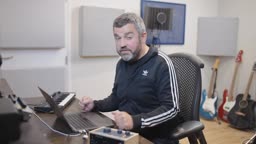
Produced by FaderPro, our sister TrueFire Studios’ company, master producer Jono Buchanan’s Basics of Home Recording walks guitar players step-by-step through the process of creating high-quality recordings from home. Students will learn the language of production and how to use all the gear you need to record yourself and turn your musical ideas into a beautiful finished product — all from home!

Our surveys tell us that the vast majority of our students are either already recording themselves at home or anxious to learn how. We also learned that many of our students already have the home recording gear on hand but can’t quite get up and running as quickly as they would like to.

If that sounds like you, Jono’s Basics of Home Recording will have you up and running quicker than you could ever imagine. Don’t let the “Basics” fool you into thinking that you already know the “basics” — this course goes way beyond “basic”.

Jono Buchanan is an Apple-certified instructor, a working composer, a sound designer, a mix engineer, and a master of all things production. His professional credits include remixes for Whitney Houston, Pet Shop Boys, LeAnn Rimes and many more.

He is also passionate about education as you will see and hear for yourself as you work through his step-by-step curriculum. Jono’s clear and succinct teaching style has established him as a favorite among music producers of any level from beginners to pro advanced.

Most players have Garage Band which is why we chose it for this course. What most players don’t know is how wide Garage Band’s feature set is, which makes it an ideal for this course and to serve as your “gateway” DAW — what you’ll learn on Garage Band can easily be translated to virtually any other DAW, especially Logic!

You're gonna learn how to use an audio interface and record multiple guitar parts and vocals. You’ll learn how to put together drum parts using the unique Garage Band drummer instrument, allowing you to use a very simple set of controls to create really sophisticated drum parts. You're going to learn how to work with mini keyboards to play software instruments. Jono will also introduce you to advanced features like “automation” for controlling parameters like volume to make dynamic changes through your mixes.

Jono will teach you how to “produce” — taking multiple individual tracks and building up a song arrangement. You’ll learn how to take your audio recordings and put them in time, and even tune them if necessary.

Here’s the best part… this step-by-step quick start learning journey leads you directly to the pro world of Logic Pro 10 because you can open your Garage Band projects in Logic and step your game. Yes, our partners at FaderPro will teach you that as well.

Work through this course and you'll be able to speak the language of recording, you’ll know how to assemble the “kit” you’ll need for recording different ideas, you’ll know how choose the right audio interface for your different recordings, and you'll know how to make recordings working with instrumentalists and singers to enhance your productions with their performance.

You'll also know how to apply effect processing so that you can take those recordings and make them sound even better, and you'll also understand what your next best steps are in terms of where you want to go next.

Whether you just want to record yourself playing over tracks or take it to the next level — Basics of Home Recording is your fast-track ticket.

Of course, you’ll have all of TrueFire’s learning tools at your fingertips to loop or slow down any video lesson so you can learn at your own pace.

Grab your guitar and let's record some music with Jono Buchanan!

What you'll learn

  • Use EQ to shape tone and create space in a mix
  • How to replace weak performance sections with stronger takes
  • How to comp (compile) the best parts of a performance into a cohesive whole
  • Understand the difference between track effects and master effects
  • Learn how to apply compression to control vocal dynamics
Release date: 03/20/2023 • 3h 56m runtime
Start Course
Sample lessons
GarageBand Interface Tour
Demonstration
Recording Acoustic Guitar
Part 1 - Demonstration
Recording Lead Vocals
Demonstration
Audio Quantize
Audio Quantize
Demonstration

What's included

40 lessons

Basics of Home Recording
In this course, you will learn how to use GarageBand. Despite it sounding simple, GarageBand actually has a wide range of features. You will learn how to plug microphones into an audio interface to make recordings. You will also learn how to create drum parts using GarageBand's unique instruments and how to play software instruments using mini keyboards. These skills will enable you to create a production, a series of individual tracks recorded to build up a song.You will learn how to take audio recordings and put them in time and in tune, as well as how to collaborate with other musicians. Effects processing will also be covered, allowing you to enhance the tone, dynamics, and spaces around your recorded sounds. You will also learn about advanced features like automation and how GarageBand can be a first step into a professional recording journey by opening a project in Logic Pro 10.After taking this course, you will be able to speak the language of recording and understand the kit needed to make the recordings you want. You will know how to work with instrumentalists and singers to enhance your productions and apply effect processing to make your recordings sound even better. You will also know your next best steps in terms of where you want to go next with your recordings, whether it's just to realize a mix of your song or take it to the next step into Logic Pro 10. Most importantly, this course will help you get beyond the daunting first steps on your home recording journey and quickly make great sounding productions.
Overview
Recording, like many other fields, comes with a glossary of terms that you may not have encountered before. In this chapter, we'll explore some of the key words you'll hear a lot when it comes to recording: hardware, software, interfacing, monitors, automation, MIDI, and more.
Overview
In this lesson, we will cover everything you need to start home recording. You will need a computer as the centerpiece of your software studio, preferably an Apple MacBook Pro since the course is based in GarageBand. It is advisable to plug in the power during recording to avoid running out of battery. An audio interface is also necessary to connect sound sources, such as microphones and instruments, to your computer. You can plug in a microphone or instrument to one of the inputs on the interface, and then connect it to your computer via USB. Additionally, you will need a mini keyboard connected via USB to play GarageBand's software instruments. To ensure proper connection of these devices for recording, let's take a look at the back of the interface. Monitor outputs are where you plug in Jack leads to connect the interface to your speakers for playback. The power connection is called a bus powered interface, which can be run from a USB port on the computer. Many audio interfaces, especially smaller ones, can also be bus powered. Lastly, a data connection is essential.
Overview
This lesson series focuses on an introduction to Garage Band, a digital audio workstation for Mac users that provides a complete solution for home recording from the beginning of an idea to a final mix. It offers a range of features, including software instruments, effects, and opportunities to work with various music genres. The series also covers the basics of recording, editing, mixing, adding master effects, and exporting your music. Additionally, later in the course we will talk briefly about Logic Pro 10, a professional workstation that is compatible with Garage Band.
GarageBand Interface Tour
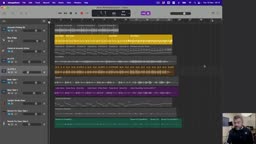
Let's take a tour of GarageBand's interface. Throughout this course, we will explore its features, but for now, let's briefly dive into its menus and get a sense of its features before starting a new project.
Good Ideas Start Somewhere
Before we can begin recording, we need something to record. Inspiration can come from various places and differ from person to person. It's common to experience an idea for a song when you're not even in the studio - like on a walk or during a morning shower. If you have an idea, it's best to start the day with it. Many people carry voice memos or phone apps to capture melodies or lyrics so they can work on it later in the studio. Others might go to a friend's house and find themselves playing a chord progression they like on the piano. Whatever the source of inspiration, it's essential to capture it and work on it later.
Good Ideas Start Somewhere
Before we can begin recording, we need something to record. Inspiration can come from various places and differ from person to person. It's common to experience an idea for a song when you're not even in the studio - like on a walk or during a morning shower. If you have an idea, it's best to start the day with it. Many people carry voice memos or phone apps to capture melodies or lyrics so they can work on it later in the studio. Others might go to a friend's house and find themselves playing a chord progression they like on the piano. Whatever the source of inspiration, it's essential to capture it and work on it later.

+ 33 more lessons

Start Course

Reviews

2 results

paddymoore

03/25/23

Keep a notebook handy - there's lots to learn

Jono has put together a very informative course on Home Recording which is all the better for presenting concepts in bite size pieces. He has a lot of recording experience which he delivers in a straight forward, easy to grasp, way and, throughout, he drops little nuggets of information designed to save you time and frustration - hence the need to keep a notebook handy! His weapon of choice is Garageband but the course is about the process of creating and recording music and not Garageband. It's a little gem
bloos66

03/22/23

Excellent beginner's course

I watched this course today and got hooked. It's a 'basics' course with clear explanations, lots of examples and covers a wide area of recording concepts. I liked the automation chapter, plus explanation of the master channel effects. Well worth watching and keeping for future reference.

Stop searching. Start improving with All Access.

Try 14 days free. Cancel any time.